Fieldstub › Docs › Architecture
How the integration works
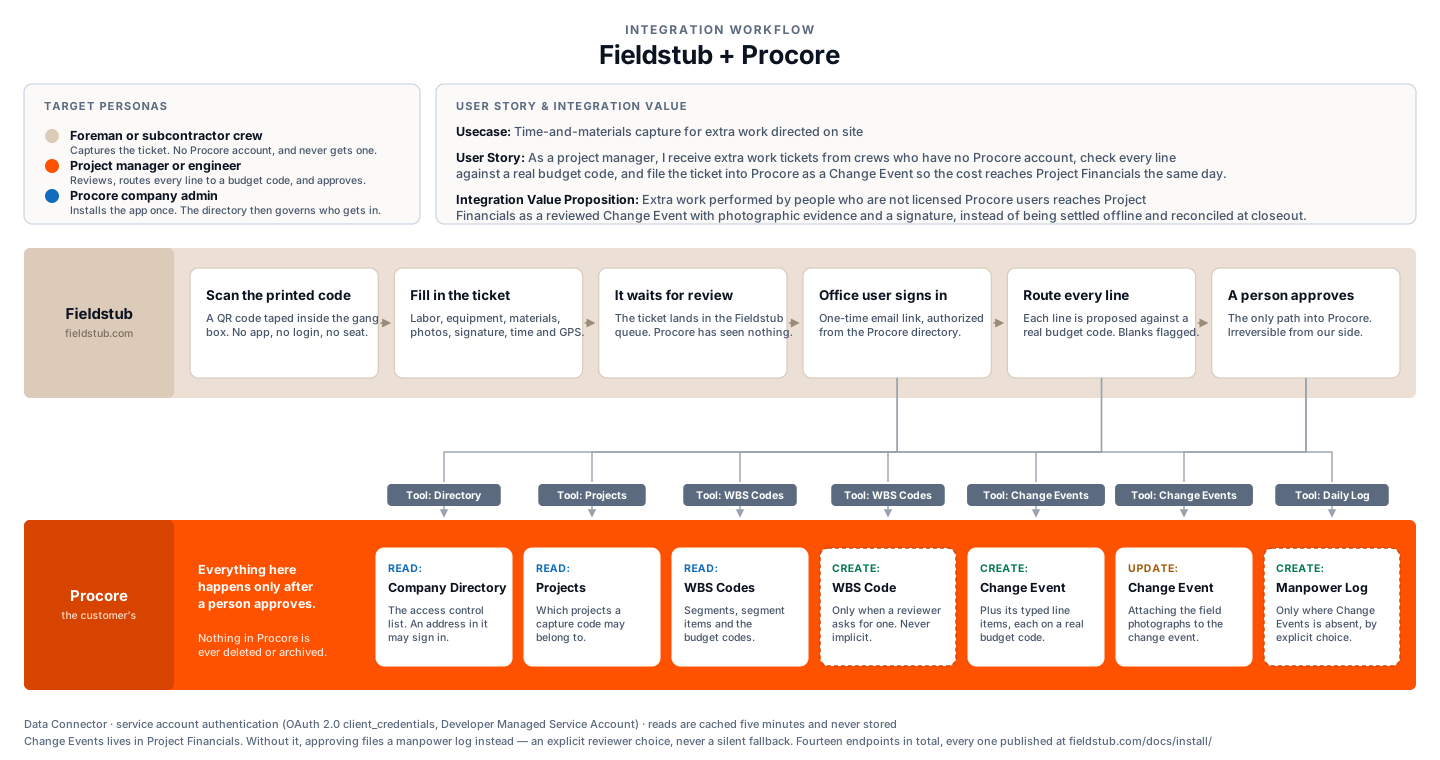
One diagram, two lanes, and one gate. If you are evaluating Fieldstub for a Procore account you administer, this is the page that answers what moves, in which direction, and at which point in the day.
The workflow#
What we read, and why#
Three reads, each of which exists to serve the write. We do not read anything that is not needed either to decide who may sign in or to place a line of cost on a real budget code.
| What | Why |
|---|---|
| Company Directory | This is the access control list. An email address in your Procore directory may sign in to your Fieldstub workspace and nobody else may. We never modify it |
| Projects | The project picker, and confirming a capture code belongs to a project you own |
| Work Breakdown Structure | Segments, segment items and WBS codes, so each line of a ticket can be proposed against a real budget code rather than a guess |
| Project Vendors | Only on a daily-log approval, to attribute the manpower log to the right subcontractor. Never modified |
What we write, and when#
Only after somebody in your office approves. There is no automatic path from a submitted ticket to a Change Event and no setting that creates one.
| What | When |
|---|---|
| Change Event | On approval. Lives in Project Financials, and carries the cost into the budget and on toward a change order |
| Line items | With the change event. Typed, each on a real WBS budget code |
| Photo attachments | With the change event |
| A new WBS code | Only when a reviewer explicitly routes work the budget has no line for, and only if the company has switched code creation on. It is off by default |
| A manpower log | Only on a project without the Change Events tool, and only when the reviewer explicitly chooses the daily log. What that fallback is worth, in full |
Approving is irreversible from Fieldstub. A Change Event in your Procore is a real financial record and Procore provides no way for us to withdraw one, so corrections happen in Procore.
Why the gate is the whole design#
Procore accepts a line item with a blank budget code. It returns success, and the cost lands nowhere. There is no warning, and nothing in the response tells you it happened.
That single behavior is why Fieldstub has a review queue instead of a sync. Every line is routed before it is filed, anything we could not route with confidence is flagged to the reviewer, and a line can only be filed blank if a person says so out loud.
The agentic surface#
Fieldstub is also an MCP server, so an assistant can draft a ticket from a description of what happened on site and read exactly where the money would land before anyone approves it. That surface gets its own diagram, because the question it has to answer is not what moves between the two systems but what an agent can do and what stops it.
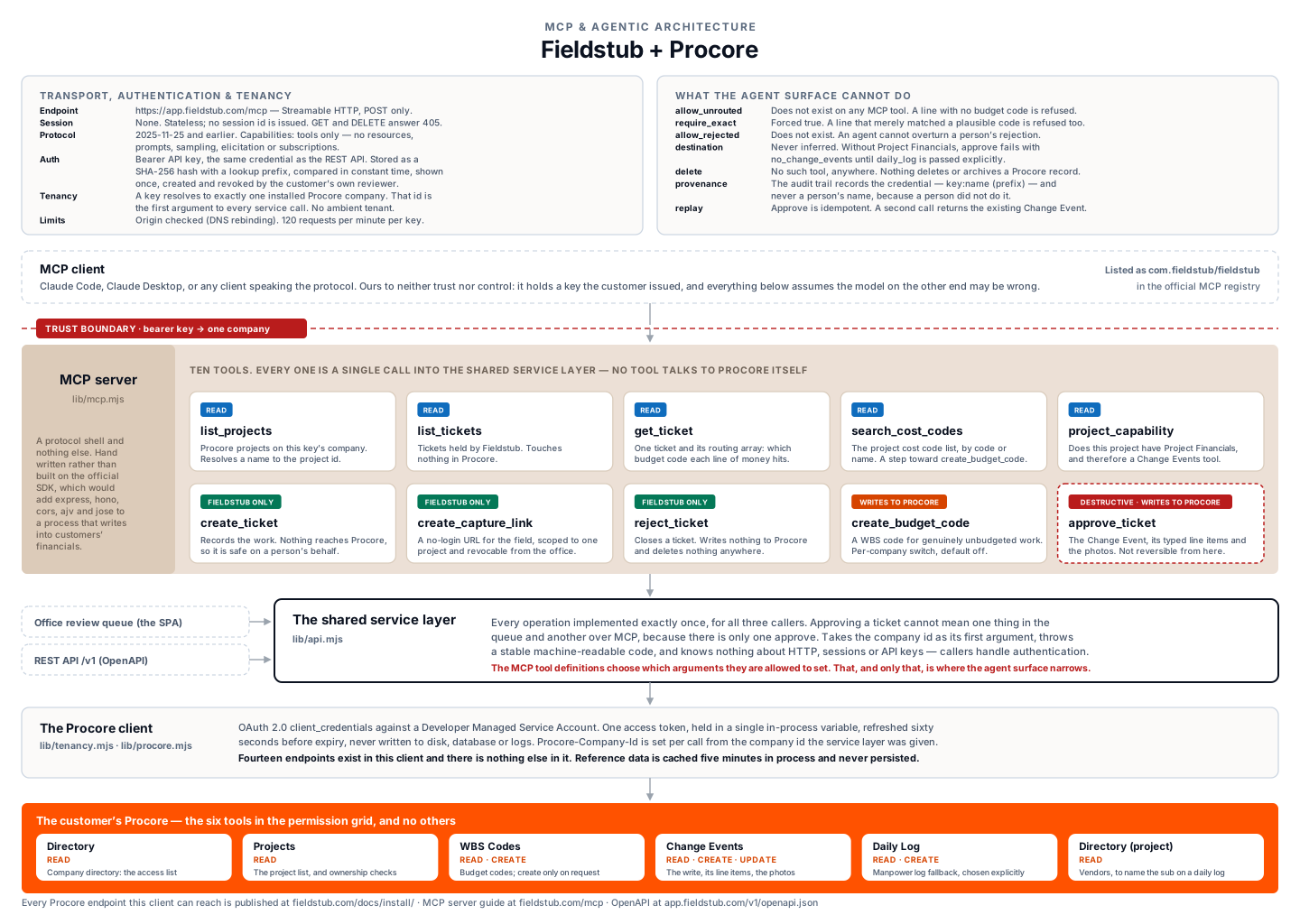
Three things about it are worth saying plainly.
| What | Why it is built that way |
|---|---|
| No tool talks to Procore | Every one of the ten is a single call into the same service layer the review queue uses. There is no second implementation of approving a ticket, so the two cannot drift apart on the day one of them gets a fix |
| The agent surface is narrower than the human one | The escape hatches a reviewer gets on screen do not exist over MCP. A line with no budget code is refused, a line that merely matched a plausible code is refused, and an agent cannot overturn somebody’s rejection |
| A key is one company | The bearer key resolves to exactly one installed Procore company, and that id is the first argument to every call beneath it. There is no way to name another |
The key itself is created and revoked by a reviewer in your own Fieldstub queue, stored as a SHA-256 hash, and shown once. When an agent approves a ticket, the audit trail records the credential rather than a person’s name, because a person did not do it. The MCP server guide has the tool list in full.
Authentication and tenancy#
Fieldstub authenticates to Procore as a Developer Managed Service Account using OAuth 2.0 client credentials. There is no user-level OAuth: the person in the field has no Procore identity to authenticate as, and the office side is authorized against your directory instead.
Every tenant is a Procore company. The company id is the first argument to every operation in the service layer, so there is no ambient tenant and no default to fall back on, and a request for another company’s record returns 404 rather than 403.
The complete list of endpoints we can reach is on the install page. There are fourteen, and there is nothing else in the client.
Questions
Does anything reach Procore automatically?
No. Every ticket waits in a review queue until a person in your company approves it. There is no automatic path and no setting that creates one.
Does Fieldstub become the system of record?
No. Procore stays the system of record. Fieldstub captures a document that does not exist in Procore yet, a signed field ticket from somebody without a seat, and files it into Procore. Data moves toward Procore, never away from it. Nothing is exported or warehoused.
What happens to a field submission if it is never approved?
It stays in the review queue. Nothing expires and nothing is filed. Rejecting it is also a decision a person makes.
Where is the data held?
In the United States, on Railway, in its San Francisco region. Railway is SOC 2 Type II and SOC 3 certified and encrypts data at rest at the storage level. Full detail on the Trust and security page.
Put a code on one job and see what comes back.
Fieldstub turns a phone and a QR code into a signed Change Event in Procore. The field needs no login and no seat.
Start free