Installing Fieldstub in Procore
Installing takes a couple of minutes and there is no account to create. Everything Fieldstub knows about your people comes from your Procore company directory, so there is no user list to set up here and none to maintain later.
You need to be a Procore company administrator to install an app. Change Events lives in Project Financials, so that is what a ticket needs to become one; on a project without it, approving files the signed record to the Procore daily log instead. Procore's own guide to installing an app covers the Procore side of the install.
What happens when you install#
Fieldstub gets read access to your company directory and your project list, and the ability to write Change Events. It does not create Procore users, it does not consume seats, and it does not send anything to the people in your directory.
Nothing appears inside Procore until somebody in your office approves a ticket. Until then Fieldstub is only reading.
After installing, three things to do#
The first is in Procore; the other two are in Fieldstub.
- Permit your projects. In Procore, open Company Admin → App Management → Fieldstub → Permissions and add each project Fieldstub should work on to the Permitted Projects list. Project permissions only apply to projects on that list — skip this and every project-level call is refused.
- Sign in. Go to app.fieldstub.com/login and enter your work email. You will get a one-time link. There is no password.
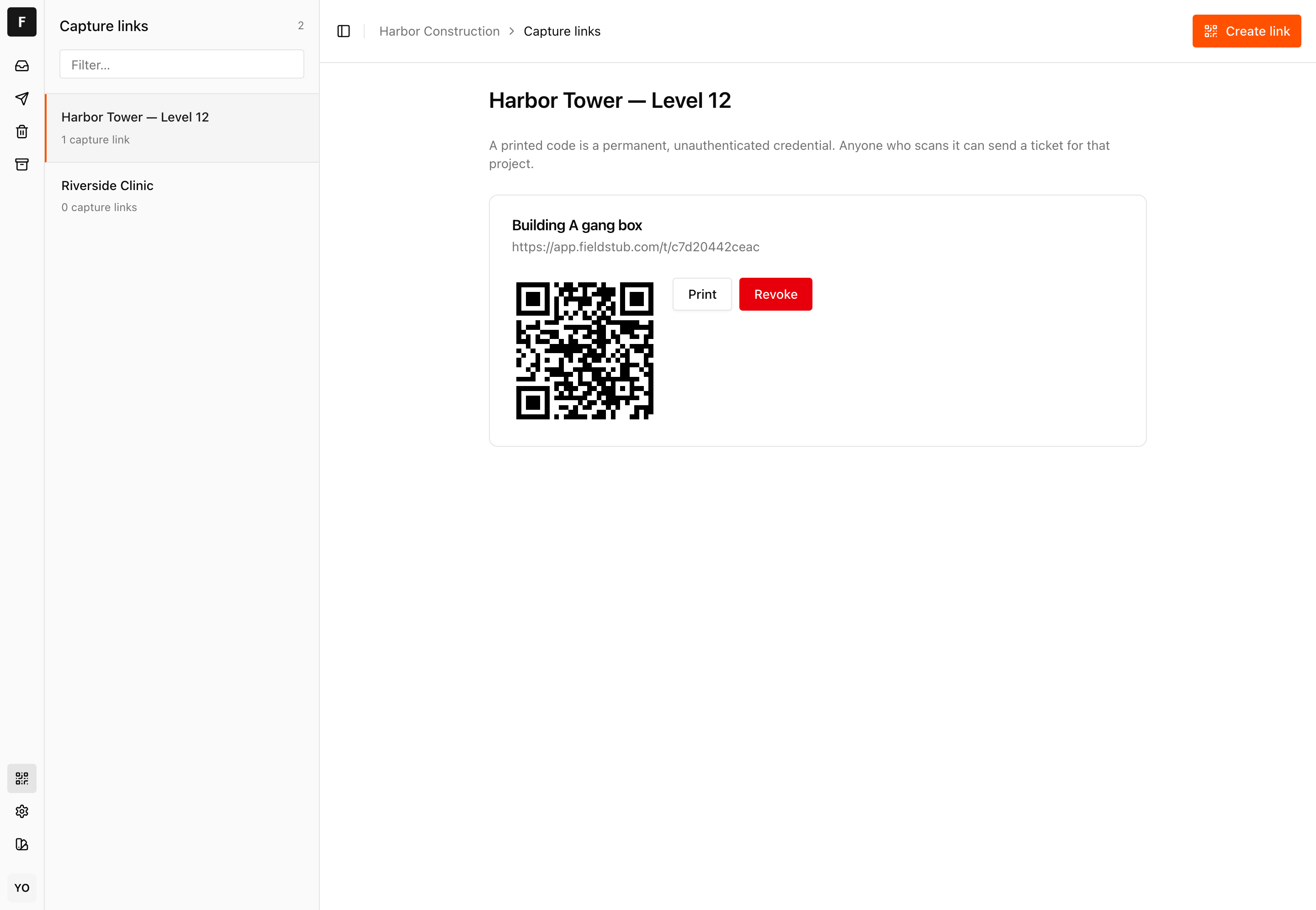
- Print a capture code. Open Capture links, pick a project, and print the QR code. Tape it inside the gang box or the job trailer.
That is the whole setup. Anyone who scans that code can submit extra work from their phone.
Who can sign in#
Anyone in your Procore company directory, and nobody else. There is no invite flow and no user list inside Fieldstub, on purpose. It would be a second copy of a list you already keep, and it would be wrong the first time somebody left.
So to give a project manager access to the review queue, add them to your Procore company directory. To take it away, remove them there. Changes take effect within a few minutes.
The person filling in a ticket is a different matter entirely: they need nothing. No Procore seat, no account, no app, no invitation. They scan the code and type. That is the point of the product, and it is why subcontractors and crews can use it on day one.
Nothing is written to Procore without a person#
Every submitted ticket lands in a review queue that works like an inbox: Needs review, In Procore, Rejected. Somebody in your office opens a ticket, checks the line items and the budget code each one will be filed under, and approves it. Only then does Fieldstub write the Change Event.
This exists because of a specific Procore behavior. Procore accepts a line item with a blank budget code without any warning. It returns success and the cost quietly lands nowhere. So Fieldstub flags any line it could not route with confidence and refuses to file it blank unless a reviewer explicitly says so. A reviewer can also create a budget code on the project without leaving the queue, for genuinely unbudgeted extra work — that is a per-company setting in Fieldstub, off by default, because on a budget synced from an ERP a new code belongs in the ERP.
On a project without the Change Events tool, approving works differently and never silently: the reviewer is told the project has no Project Financials and must explicitly choose to file the record to the Procore daily log instead. A daily log entry is a dated record, not money on a budget code, and the screen says so before anything is written.
Approving is not reversible from Fieldstub. A Change Event in your Procore is a real record, and there is no undo endpoint, which is why approval is a deliberate act by a named person rather than anything automatic.
Exactly what Fieldstub can reach#
The complete list. Every endpoint the application is capable of calling, last audited 31 August 2026. There is nothing else in the client.
| Endpoint | Read or write | Why |
|---|---|---|
/companies | Read | Which companies installed the app |
/companies/{id}/users | Read | The directory. This is the access list |
/projects | Read | The project picker, and checking a project is yours |
.../work_breakdown_structure/segments | Read | Cost codes and cost types, for routing |
.../segments/{id}/segment_items | Read | The same |
.../work_breakdown_structure/wbs_codes | Read | The budget codes a line can be filed to |
.../work_breakdown_structure/wbs_codes | Write | Creating a code for unbudgeted extra work, if your company switched that on |
/change_events | Read | Checking whether a ticket was already filed, and whether a project has the Change Events tool at all |
/change_events | Write | The change event itself |
/change_events/{id}/line_items | Write | Its line items |
/change_events/{id} | Write | Attaching the photos |
/projects/{id}/vendors | Read | On a daily-log approval, attributing the log to the right subcontractor |
/projects/{id}/manpower_logs | Read | Checking a daily-log record was not already filed, since Procore does not dedupe these |
/projects/{id}/manpower_logs | Write | The daily-log fallback, only where Change Events is absent and only by the reviewer's explicit choice |
Nothing reads your commitments, contracts, drawings or documents. Vendors are read only on a daily-log approval, to name the subcontractor on the log. Nothing modifies your directory. The only things Fieldstub creates in Procore are change events, their line items, their attachments, occasionally a budget code a reviewer asked for, and, on a project without Change Events, a manpower log the reviewer explicitly chose.
If something is missing#
| What you see | What it means |
|---|---|
| Your email is refused at sign-in | That address is not in the Procore company directory, or the install has not finished. Check the directory first |
| No projects in the picker | The Procore account has no active projects the app can see, or the install was scoped to a different company |
| Everything on one project fails | That project is not on the app's Permitted Projects list in Procore. Company Admin → App Management → Fieldstub → Permissions |
| A ticket is stuck in Needs review | That is the normal state. It waits for a person. Nothing expires |
| Approve fails with a routing error | A line has no budget code chosen. Route it, or create a code on the project from the same screen |
| Change Events is missing in Procore | The project does not have Project Financials. Tickets are still captured, and approving offers to file the record to the daily log instead of a change event |
Removing it#
Uninstall the app from Procore and Fieldstub loses all access immediately. The credential is scoped to the install, so there is nothing left for it to read.
Change Events that were already written stay in your Procore. They are your records, created by a person on your team, and removing an integration should not touch your financial history.
Getting help#
Email hello@fieldstub.com. A real person reads it.
If you are wiring Fieldstub into something else, there is a REST API and an MCP server, and you can issue keys yourself from Settings.
Questions
Do subcontractors need a Procore seat to submit a ticket?
No. They need a phone with a browser. There is no account, no app, no login and no invitation. They scan the QR code and fill in the form. Only the office side, where tickets are reviewed and approved, requires being in your Procore directory.
How do I give someone access to the review queue?
Add them to your Procore company directory. That is the whole access list. There is no separate user list in Fieldstub. Removing them there removes their access here within a few minutes.
Does Fieldstub require Project Financials?
For change events, yes, because that is the tool change events live in. On a project without it, tickets are still captured with photos and a signature, and approving files the signed record to the Procore daily log instead. That is a dated record rather than money on a budget code, the reviewer chooses it explicitly every time, and it is never the silent default.
Can Fieldstub write to Procore without anyone approving it?
No. Every ticket waits in a review queue until a person in your company approves it. There is no automatic path from a submitted ticket to a change event, and there is no setting that creates one.
What happens to my data if I uninstall?
Fieldstub loses access to your Procore immediately. Change events already written stay in Procore as your records.
Put a code on one job and see what comes back.
Fieldstub turns a phone and a QR code into a signed Change Event in Procore. The field needs no login and no seat.
Start free