Fieldstub › Docs › Budget codes
Procore budget codes, and why your change event line item lands blank
If you are writing change event line items into Procore through the API and they are all landing on a blank budget code, you have hit a real trap and not a mistake in your data. Procore accepts two shapes for budget_code. One works. The other passes validation, returns 200, and is then thrown away.
This page is what we learned probing the API for Fieldstub. It cost most of an afternoon, and none of it is in the documentation.
The short version#
A line item's budget code must reference an existing WBS code by id:
"budget_code": { "id": 1870754 }Procore also accepts this, which looks more natural and is wrong:
"budget_code": { "segment_items": [ { "segment_id": 1, "segment_item_id": 2 } ] }flat_code: ""). Distinct segment items go in, an identical id comes out, and there is no error, no warning, and nothing in the response that says anything went wrong.That is the worst possible failure mode. An integration built on the segment_items form looks correct in testing, writes clean 200s in production, and quietly files every dollar into a bucket nobody reviews.
What a budget code actually is in Procore#
The naming is the root of the confusion. Three different things get called a code:
| Thing | What it is | Use it for a line item? |
|---|---|---|
| Cost code | An entry in the project cost code list, like 01-000. There are often hundreds. | No |
| WBS code | A full work breakdown combination with an id and a flat_code like 01-000.E. This is what Procore calls a budget code. | Yes |
| Budget line item | A row in the budget. Has its own id, unrelated to the above. | No |
Posting a budget line item id is what named the real entity for us. budget_code: {id: 160548} comes back with Wbs Code with ID 160548 not found, which is the only place in the whole exchange that says out loud what the field wants.
WBS codes live here:
GET /rest/v1.0/projects/{project_id}/work_breakdown_structure/wbs_codesEach carries a flat_code that reads as cost code plus cost type letter. 01-000.E is cost code 01-000, cost type Equipment. The letters are Labor, Materials, Equipment, Other.
The constraint nobody mentions: WBS codes only exist for budgeted combinations#
A WBS code is created when a cost code and cost type combination appears in the project budget (Procore's overview of Work Breakdown Structure is the background reading, and creating your project's WBS is the fix when a combination is missing). A cost code with no budget line item has no WBS code at all, which means there is nothing valid to point a line item at.
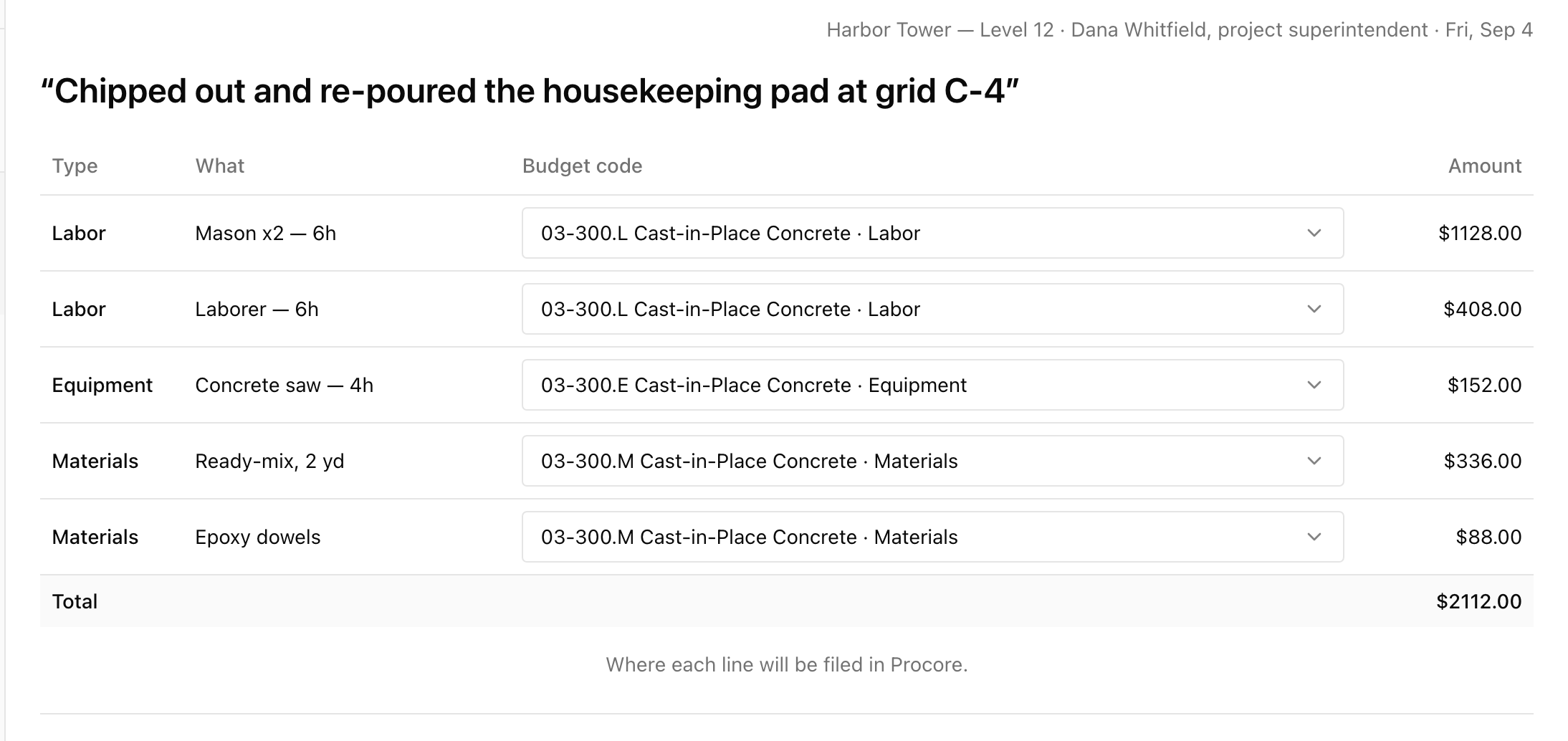
This matters more than it sounds, because extra work is unplanned by definition. The code you need is routinely the one the budget does not have yet. On a real sandbox project with 304 cost codes, a four line ticket routed materials to 09-500.M and equipment to 01-000.E cleanly, and both labor lines had nowhere to go, because the project had no budgeted labor code.
There are only three honest options at that point:
- Route the line to a different code that is budgeted, and accept it is not quite right.
- Create the budget code first, then route to it.
- Let it fall to the blank code, which is how costs go missing.
The third one is what happens by default, silently, which is the entire problem.
Creating a budget code through the API#
You can create one, and this is what makes option two above possible:
POST /rest/v1.0/projects/{project_id}/work_breakdown_structure/wbs_codes

{ "segment_items": [
    { "segment_id": 12345, "segment_item_id": 67890 },
    { "segment_id": 12346, "segment_item_id": 67891 }
] }
The body is bare. Wrapping it as { "wbs_code": { ... } } returns param is missing or the value is empty or invalid: segment_items, which reads like the field is absent when the real problem is the wrapper.
A WBS code has to name every populated segment, not just the two you care about. If the project has a Sub Job segment with entries, your body needs a Sub Job item in it as well, or the create is rejected.
If you are building this, do it in this order#
- Read the project's WBS codes once and cache them. They change rarely and every read costs rate limit budget.
- Resolve each of your lines to a
flat_codebefore you write anything, matching on cost code and cost type letter. - Treat an unresolved line as a stop, not a default. Never let it fall through to the blank code on its own.
- Give a human the unresolved ones with the project's real code list in front of them, and let them create a code if the right one does not exist.
- Write with
budget_code: { id }, and never withsegment_items.
That last human step is not a limitation to engineer away. Procore will accept a blank code without complaint, so the only thing standing between an automated write and a mis-filed cost is somebody looking at where the money is about to land.
Questions
Why does my line item have a blank budget code with no error?
Almost certainly because the budget_code was sent as segment_items rather than as an id. Procore validates that form, returns 200, discards it, and files the line on the project blank WBS code. Switch to budget_code: { id: wbsCodeId }.
What is the difference between a cost code and a budget code in Procore?
A cost code is one entry in the project cost code list. A budget code is a full WBS combination, usually cost code plus cost type, with its own id and a flat_code like 01-000.E. Line items reference the budget code, not the cost code.
Can I create a budget code that is not in the budget?
Yes. POST to the project work_breakdown_structure/wbs_codes endpoint with a bare segment_items body naming every populated segment. This is how you route genuinely unbudgeted extra work rather than forcing it onto a code that is merely close.
Does this apply to change orders and direct costs too?
The WBS code model is shared across Procore financials, so the same id-not-segment-items rule applies wherever a budget code is referenced. We verified the behavior specifically on change event line items.
Put a code on one job and see what comes back.
Fieldstub turns a phone and a QR code into a signed Change Event in Procore. The field needs no login and no seat.
Start free