T&M tickets T&M tags Extra work tickets Extra work orders Extra work authorizations Field work orders Force accounts Dayworks sheets → Procore Change Events

You did the work. You just never billed it.

Anyone on the job scans a code, says what happened, snaps a photo, gets it signed. It lands in Procore the same day as a Change Event, cost coded and backed up, ready to price into a change order. No app. No login. No Procore seat.

Free tier, no card, no demo call. Prices are on this page.

A worker in an orange high-visibility vest, white hard hat and safety glasses stands beside a site office trailer holding a phone that shows the Fieldstub capture form. Taped to the trailer beside him is the printed capture sheet, headed "Extra work today? Scan this. It takes about two minutes", with a QR code and three numbered steps below it. Scaffolding and a steel frame rise behind.
That code is live. Scan it off the screen, or open the form.
How it works

A code on the trailer, and it ends up in your budget.

Four steps. The first two happen on a phone belonging to somebody who has never heard of your Procore account, and the last one is money on a budget code.

  1. 1

    Tape up a code

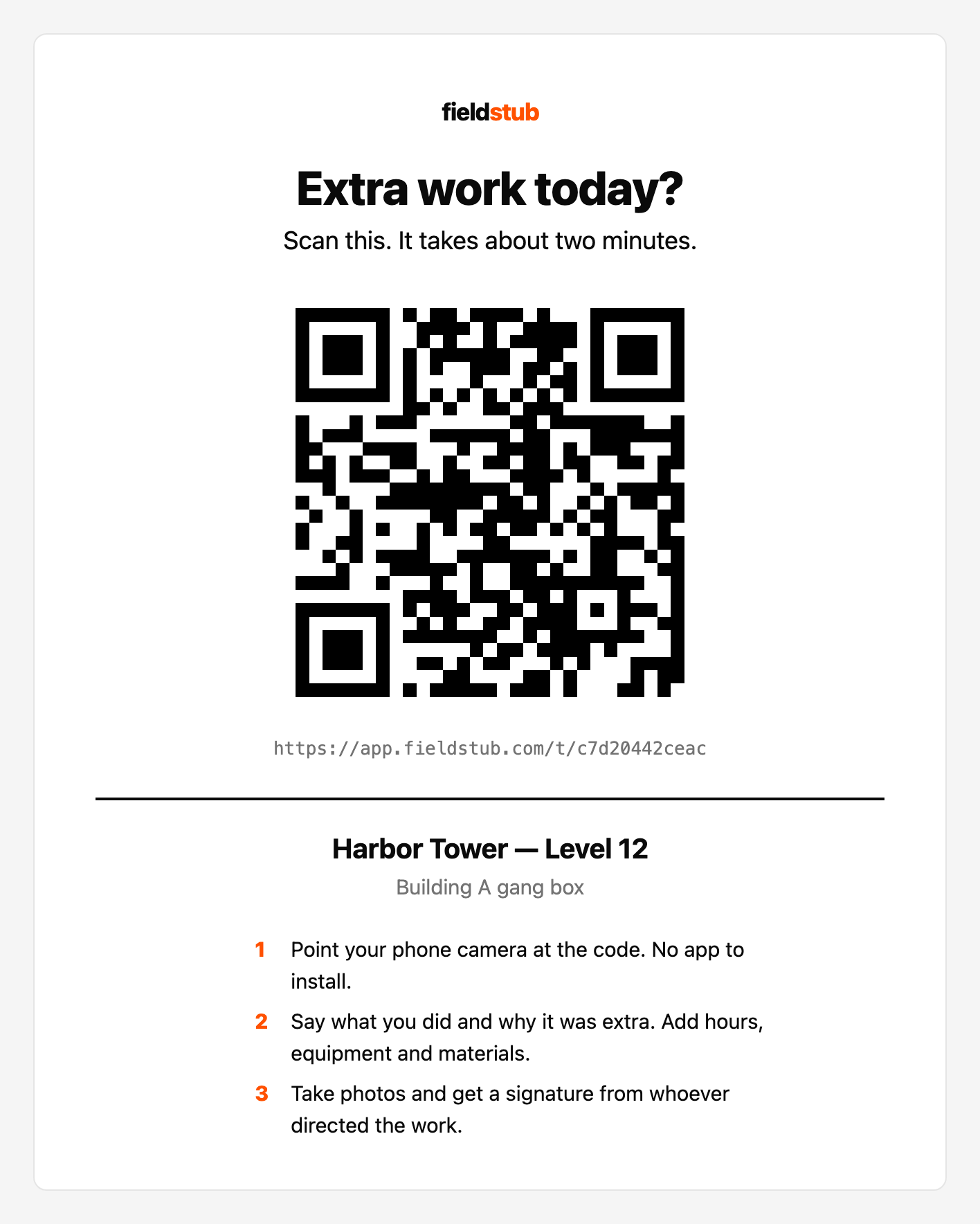
    One per job. Print it from the app and put it where the work is: gang box, trailer door, back of a hard hat sticker. It never expires and you can revoke it the day the job closes.

    The printable Fieldstub capture sheet, headed "Extra work today? Scan this. It takes about two minutes", with a large QR code, the address it opens, the project and location, and three numbered instructions below.
    This one is live. Scan it, or open the form.
  2. 2

    The field scans it and talks


    It opens a form in the phone browser. No app, no login, no Procore seat. Ten questions one at a time, and they can hold a button and say the answer instead of typing it, in English, Spanish or French.

    The Fieldstub capture form stepping through itself on a phone: what work happened, dictated aloud with a level meter running; why it was extra; who directed it; a picker for labor, equipment and materials; a labor line; and a signature drawn on the pad.
    Hold to talk. Ten questions, one at a time.
  3. 3

    Your office approves it

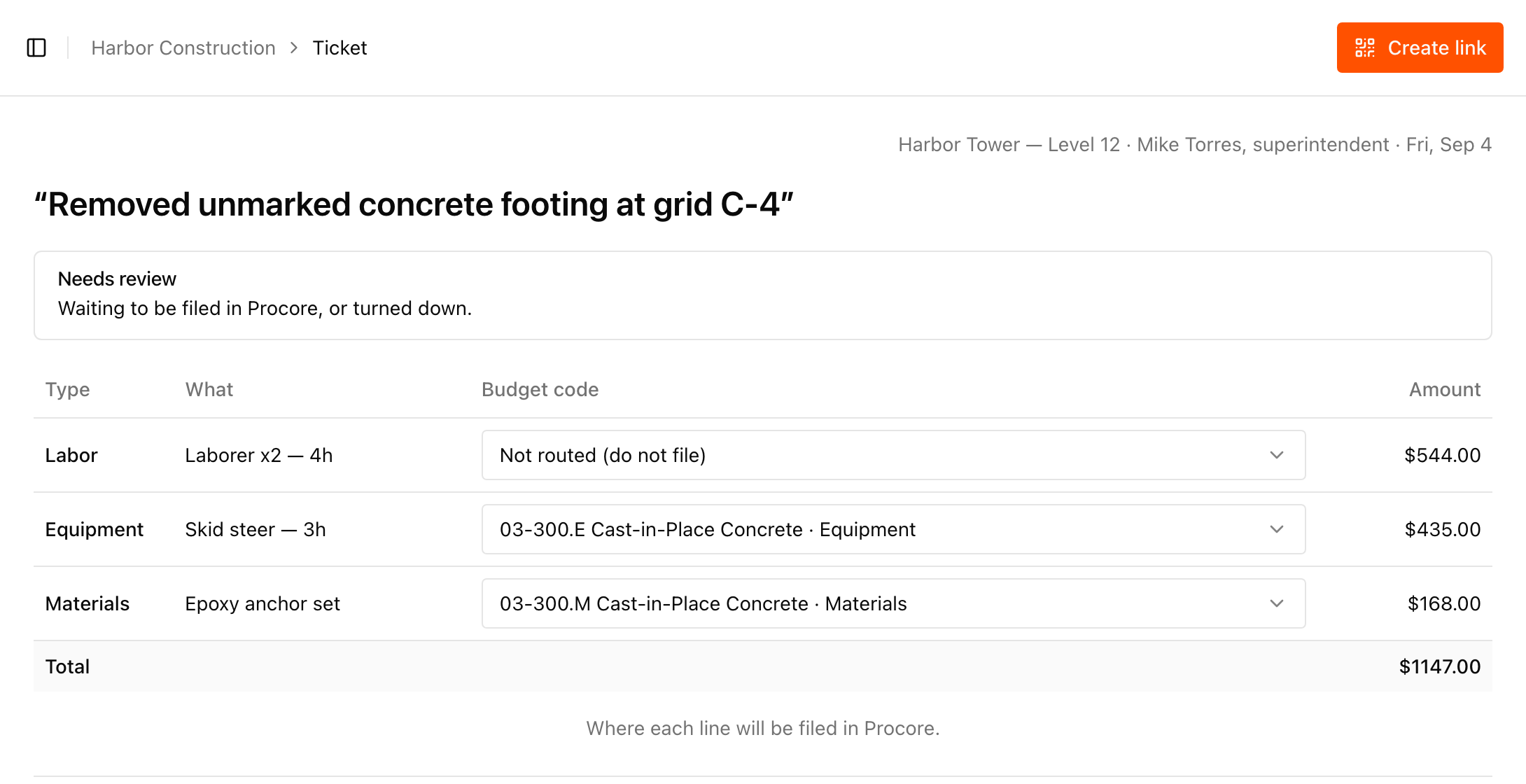
    It arrives in a queue with the cost codes already resolved. Nothing reaches your financials until somebody here says so, line by line, seeing exactly where each dollar lands — and the ticket records which somebody.

    The Fieldstub review queue with a ticket open. Cost lines for labor, equipment and materials each show the Procore budget code they will be filed against, except one labor line reading "Not routed (do not file)". A warning below reads "1 line not on a budget code. Procore will accept a blank code with no warning," with an unticked checkbox labelled "File blank anyway", above Reject and Approve buttons.
    Procore accepts a blank budget code without complaining, which is how costs quietly go missing. So a line nobody placed cannot be filed by accident.
  4. 4

    It lands in Procore

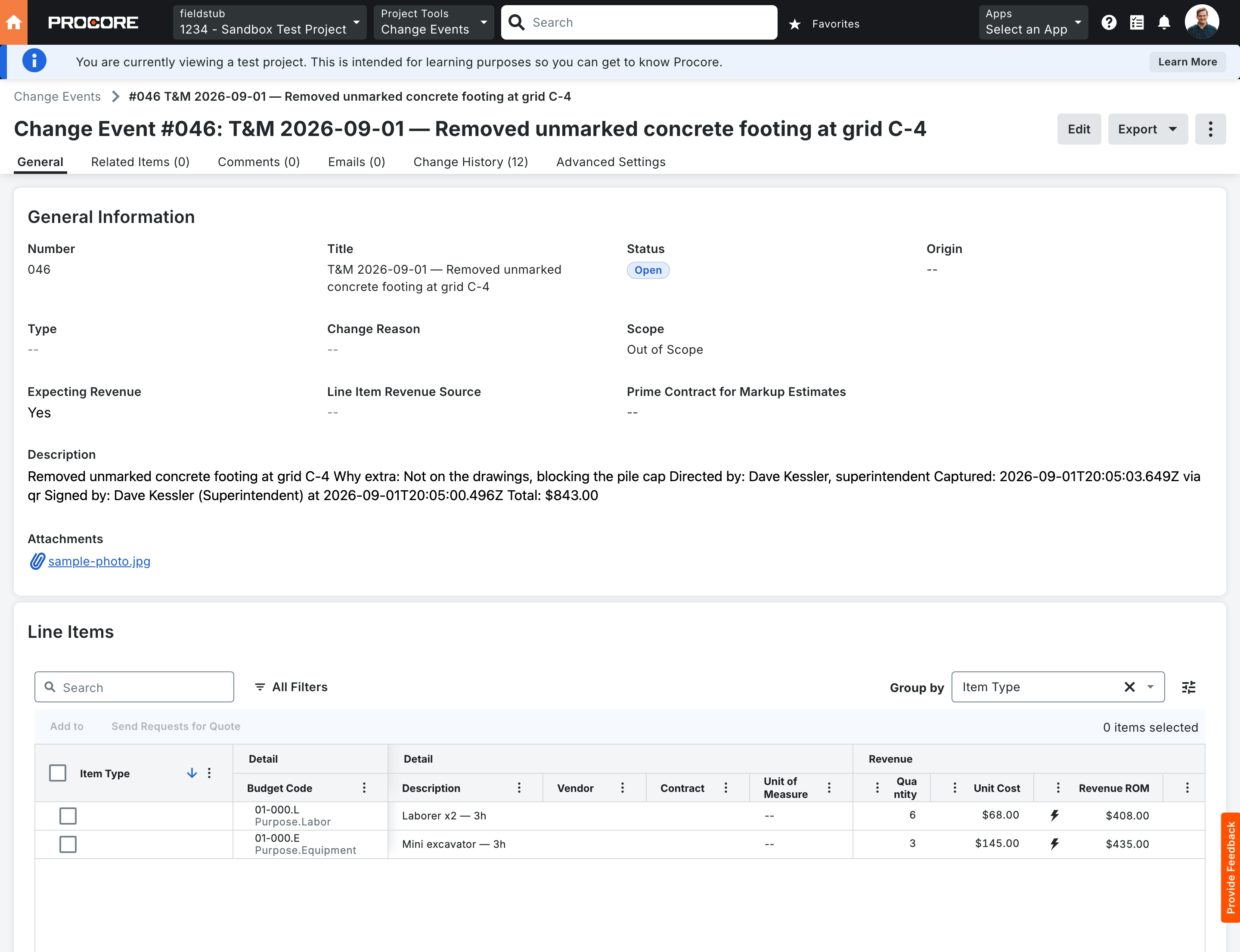
    A real Change Event on the GC’s instance, with typed line items on real budget codes, the field photo attached and who directed the work on the record. Ready to price into a change order. Not a PDF in a folder.

    Change Event #046 open in Procore, titled "T&M 2026-09-01 — Removed unmarked concrete footing at grid C-4", scope Out of Scope, the field photo attached, and a description carrying why the work was extra, who directed it, when it was captured and who signed for it. The Line Items table below shows two rows against real budget codes, 01-000.L Purpose.Labor and 01-000.E Purpose.Equipment.
    Procore’s own Change Events tool, holding a ticket captured on a phone by somebody with no Procore account.
Why this one

The people doing the extra work don't have Procore.

That is the whole problem. Every tool for this assumes the person holding the information has a seat, a login, and twenty minutes. Subs and crews have none of those and never will.

Nothing to adopt

No app download, no account, no training, no license to buy for a sub you'll be off the job with in six weeks.

Nothing writes without you

Every ticket waits in a queue. You see the cost codes it will hit before it hits them. Bad data in Financials is worse than no data.

Built on your budget codes

Line items land on real budget codes from your project. Anything we can't route gets flagged instead of quietly filed somewhere wrong.

FieldstubThe usual
Field person needs an account No Yes, or a seat on someone's platform
See the price before you talk to anyone Yes, below Request a demo
Time to first ticket Same day Rollout, onboarding, training
Where it ends up Procore Change Event, cost coded Another system to reconcile
Pricing

Per project. Everyone in the field is free.

You pay for active jobs, not for people. Add every foreman, sub, and crew you want. Charging per user would just make you use it less.

Free

$0

One project, ten tickets a month.

  • Full capture, photos and signatures
  • Writes real Change Events
  • Enough to prove it on one job
Start free

Team

$299 / month

Five active projects, unlimited tickets.

  • Everything in Free
  • Unlimited field users, always
  • Extra projects $25 each
  • Support from someone in your time zone
Start with Team

One recovered ticket usually covers the year. That is the entire business case and we are not going to dress it up. The longer version of how pricing works.

Questions

The ones people actually ask.

Do we need Procore Project Financials?

Yes, for Change Events. Without it, approving files the ticket to the Procore daily log instead: the description, hours, who directed it and who signed. That is a dated record rather than money. Nothing bills from it, and the photos stay in Fieldstub because Procore discards attachments on a daily log. What that is worth, in full.

Can anyone with the link send us a ticket?

Yes, and that is on purpose. It's the only way the field will use it. Nothing reaches Procore until someone on your team approves it, so the link is a way in, not a way to write to your financials.

Doesn't Procore already have T&M Tickets?

It does, and it's fine, if the person doing the work has a Procore seat and the app. Ours is for everyone else. Different problem, and the two don't fight.

What if the cost code isn't in our budget yet?

Create it right there in the review screen. Extra work is unplanned by definition, so the code you need often doesn't exist yet. Pick the cost code and the type, and we add it to the project in Procore and route the line to it. We never guess: anything unrouted gets flagged, because Procore will accept a blank code without a word and that's how costs go missing.

Is there a demo call?

Only if you want one. Tell us the job you want to try it on and we'll get you set up, usually the same day. The one step that needs someone on your side is a Procore admin installing the app, which is a single approval.

Docs

How Procore actually behaves

Written while building this and verified against a live Procore sandbox, including the parts where the API tells you something that isn't true. Several of these findings aren't published anywhere else.

Getting extra work billed

Put a code on one job and see what comes back.

Free tier, no card, no call. If nothing turns up, you've lost an afternoon and a piece of tape.

Start free