Fieldstub › T&M tickets › T&M tickets in Procore
How to get T&M tickets into Procore
Extra work gets recorded on a jobsite by whoever is standing there, and the paperwork goes by eight different names depending on the region and the trade: T&M ticket, T&M tag, extra work order, extra work authorization, field work order, force account, dayworks sheet. The problem is the same everywhere. Whatever it is called, it has to end up somewhere that produces a bill.
There are four ways to get it into Procore. Two of them require the person doing the work to have a Procore account, which is usually where the whole thing falls apart.
The four options, side by side#
| Approach | Field needs a seat? | What lands in Procore |
|---|---|---|
| Procore T&M Tickets | Yes, plus the mobile app | A T&M ticket record, with no public API to read it |
| Manual change event | No, someone in the office retypes it | A change event, as accurate as the retyping |
| An integration | Depends entirely on the tool | A change event with typed line items, if it is built properly |
| Paper or a PDF by email | No | A file in a folder, or nothing |
The last row is the honest default and by far the most common. It is also what actually competes with everything else here.
1. Procore's own T&M Tickets tool#
Procore ships this. It captures labor, equipment, materials and a digital signature on a mobile device, and Procore describes it as modernizing the traditional carbon copy forms used on job sites. It is a good tool and it does what it says. Procore's own guide to it is here.
Two things decide whether it works for you. It requires a Procore seat and the mobile app on the person capturing the work. And it has no public REST API, so nothing else you own can read those tickets programmatically.
If the people doing your extra work are your own staff and they already carry Procore, this is the obvious answer and you should use it. More detail on what it needs.
2. Someone in the office types up a change event#
Free, works today, and the version most companies are actually running whether or not they would describe it that way.
The failure mode is not the typing. It is the two days between the work happening and the pad arriving in the office, and the fact that the person retyping was not there. What went in the bucket, who authorized it, how long the crew stood waiting: none of that is recoverable a week later, and that detail is the entire value of the record when someone disputes it in the spring.
3. An integration that writes change events#
Capture in the field, review in the office, write to Procore as a change event with typed line items on real budget codes. This is the category Fieldstub is in, and so is Clearstory, which is the established product here.
Whatever you look at, two questions separate a real integration from a form that emails a PDF:
- Who needs an account? If the sub or the crew has to be licensed, invited or trained, the tool works on the days when everyone remembers and not on the other days.
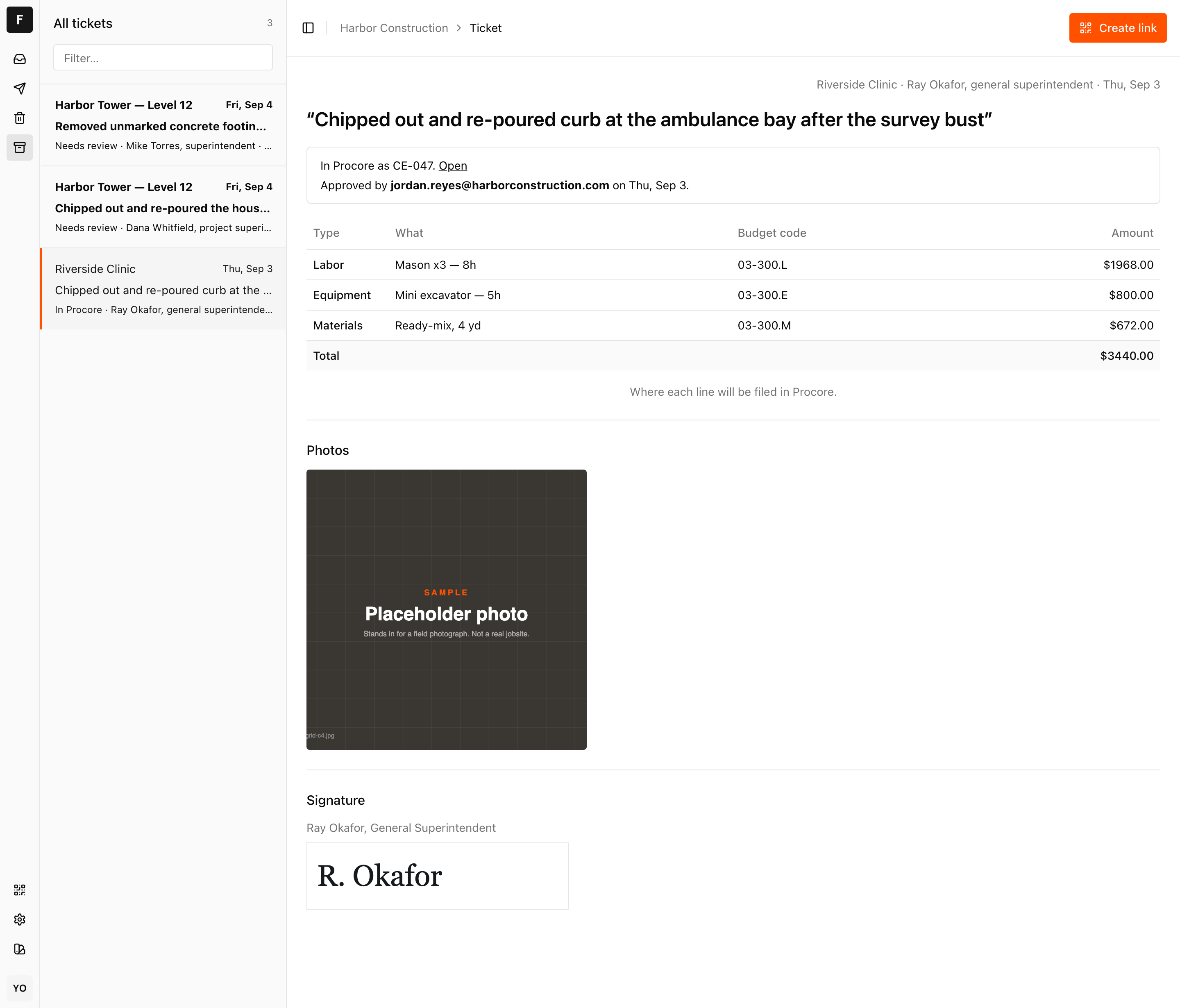
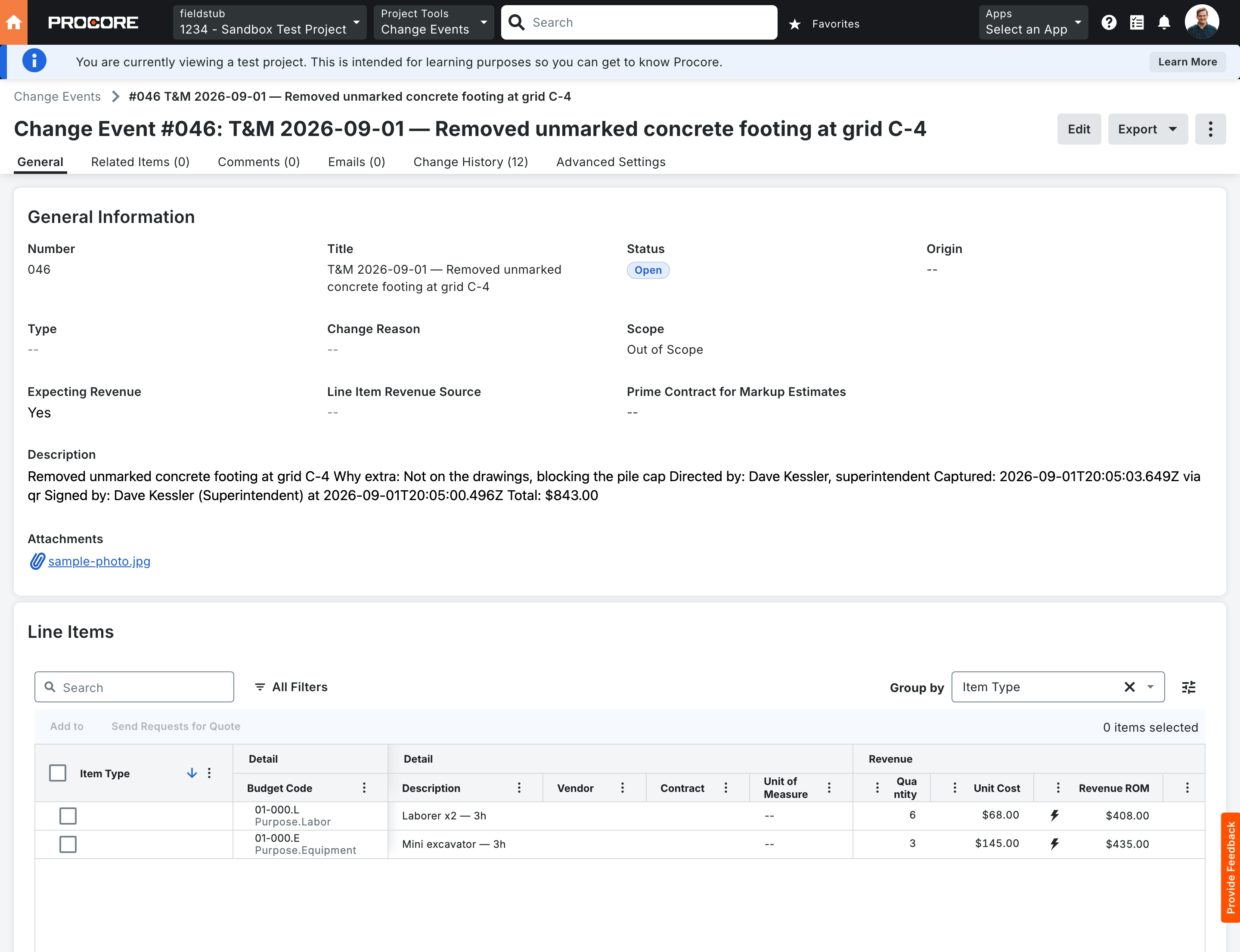
- Where does the money land? A line item has to reference a real budget code. Procore will accept a blank one without warning, which is how costs quietly disappear. Ask to see what an unroutable line does before someone approves it.
Here is what the second question looks like answered. This is a ticket after somebody in the office approved it, in Fieldstub:
And the other end of the same ticket, in Procore:
4. Paper, and why it wins so often#
A carbon copy pad costs nothing, needs no signal, works with gloves on, and every single person on the job already knows how to use it. Any replacement that is worse on those four things loses, no matter what it does afterwards.
This is worth saying plainly because it is the reason most field software fails. The comparison is not against another piece of software. It is against a pad that already works.
What "into Procore" should actually mean#
A PDF attached to a daily log is technically in Procore. It will not show up in a budget, will not roll into a change order, and will not reach Procore Pay.
The version worth holding out for is a change event with typed line items, each on a real budget code, with the photo attached and the provenance on the record: when it was captured, where, and who directed the work. That is the thing that still makes sense in a dispute next spring, and it is the thing that turns into money.
Questions
Can a subcontractor submit a T&M ticket without a Procore license?
Not through Procore's own T&M Tickets tool, which requires a seat and the mobile app. A third party capture tool can accept the ticket without an account and write it into the GC's Procore afterwards.
Does Procore have an API for T&M Tickets?
No public REST API. Twelve resource name variants return 404 and Procore publishes no developer documentation for the tool, so integrations write change events instead.
Do I need Project Financials to do this?
For change events, yes. Change Events is part of Project Financials, and without it the write target is not available. It is worth confirming what your Procore account includes before evaluating any tool in this category, including ours.
What is the difference between a T&M ticket and a change event?
The ticket is the field record of what was done. The change event is the Procore financial object that carries the cost into the budget and on toward a change order. Getting from one to the other is the whole job.
Put a code on one job and see what comes back.
Fieldstub turns a phone and a QR code into a signed Change Event in Procore. The field needs no login and no seat.
Start free